Y999 Game is a real-money gaming app popular in Pakistan, with slots, crash games, card games and fishing games in one lobby. Instead of copying claims from other websites, this guide walks through the actual Y999 Game screens as they appeared in November 2026: the home screen, sign-up options, Newplayer missions, VIP levels and the main promotions.
ApkLoomly is an independent guide, not the Y999 Game operator. Offers below reflect the app in November 2026 and can change.
The Home Screen
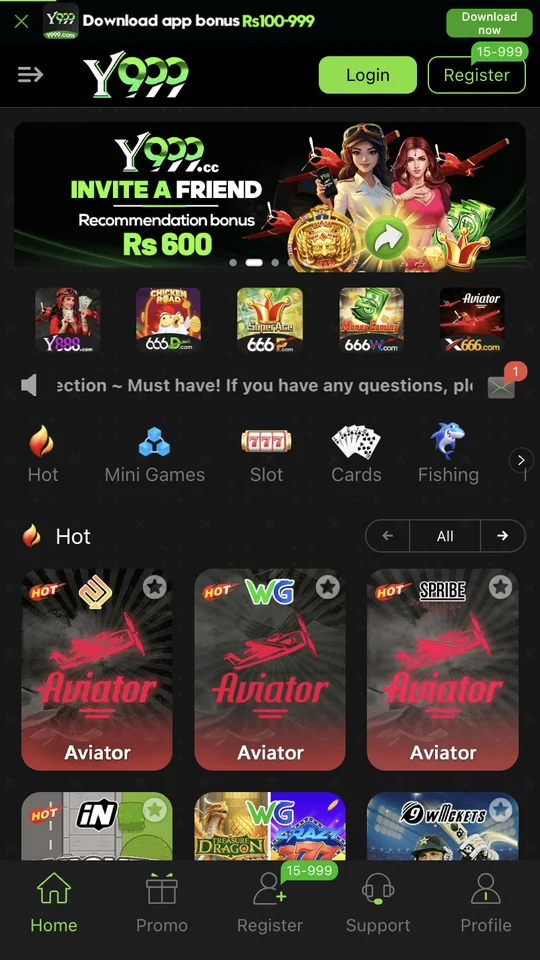
The home screen has a download bar advertising an app bonus of Rs 100–999, Login and Register buttons, a rotating banner (an “Invite a Friend, Rs 600” offer when we checked) and game categories: Hot, Mini Games, Slot, Cards and Fishing. The bottom menu has Home, Promo, Register, Support and Profile.
How to Sign Up on Y999 Game
Y999 Game accepts a Pakistani mobile number (+92) or an email. You can choose Password registration or Code register, and there are binding options for NO Wallet, Google, Facebook and Telegram. You must tick the box confirming you are over 18.
- Tap Register and enter your number without the leading 0.
- Choose a password (or a one-time code) and confirm it.
- Tick the 18+ and User Agreement box, then tap Register.
- Open Promo → Mission to see the Newplayer tasks.
Newplayer Missions
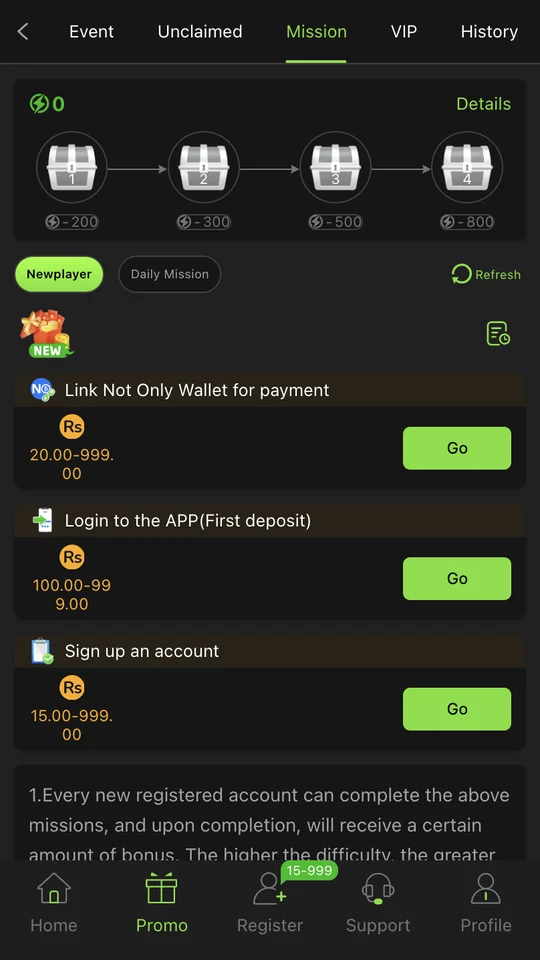
The Mission tab shows four chests that open at 200, 300, 500 and 800 points, plus Newplayer tasks with reward ranges:
| Newplayer task | Reward range shown |
|---|---|
| Sign up an account | Rs 15 – 999 |
| Login to the APP (first deposit) | Rs 100 – 999 |
| Link Not Only Wallet for payment | Rs 20 – 999 |
A range means the amount varies; most rewards land near the lower end, so plan around that.
Y999 Game VIP Levels and Salary
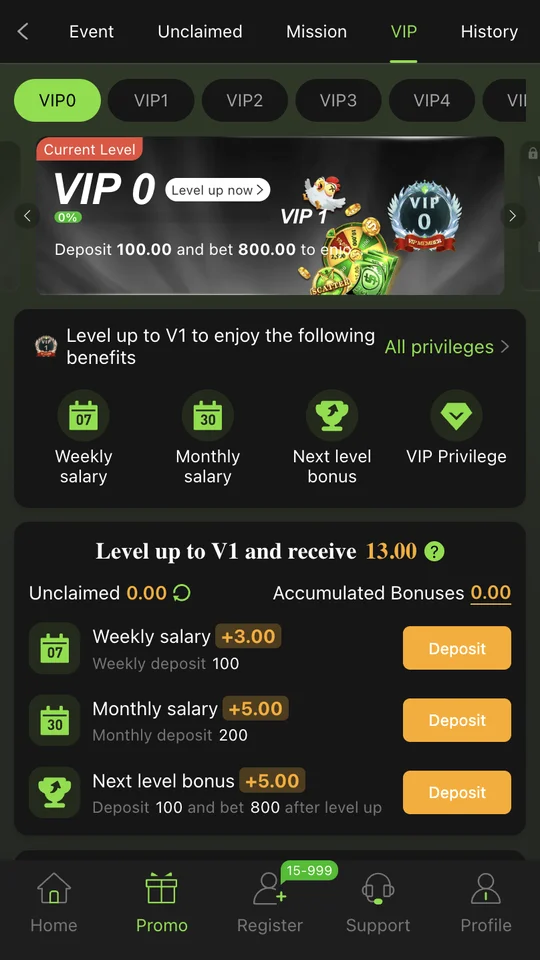
On the VIP tab, VIP1 needs a deposit of Rs 100 and Rs 800 in total bets. The app shows that reaching VIP1 unlocks a weekly salary of +3, a monthly salary of +5 and a next-level bonus of +5, for a total of 13. Higher levels add a daily salary, but also ask for much more betting, so treat VIP as a small extra, not a goal.
Main Offers
- Invite a friend: Rs 600 recommendation bonus and up to 3% daily commission.
- USDT Wallet: a banner offering a 5% reward on USDT deposits.
- NO Wallet: banners about deposit and withdrawal perks through the NO (Not Only) Wallet.
- Redeem Code: a button in Promo for codes shared in official channels.
Safety Tips
- If you see “the main hall is down”, tap Switch lines inside the app; do not search for backup links.
- Get redeem codes only from the official channels linked under Promo → connect.
- Never share your password, OTP or wallet PIN with an “agent”.
- Keep Google Play Protect on and set a weekly budget.
Real-money gaming is restricted in Pakistan and carries financial risk. 18+ only. See our disclaimer.
Common Problems and Quick Fixes
| Problem | What usually fixes it |
|---|---|
| “Main hall is down” pop-up | Tap Switch lines inside the app, or change from Wi-Fi to mobile data. |
| Mission still shows Go after finishing | Tap Refresh on the Mission tab and wait a few minutes. |
| Reward not in balance | Open the Unclaimed tab; many rewards must be collected there. |
| Deposit not showing | Wait, keep the wallet transaction ID, then contact Support inside the app. |
| Redeem code says invalid | Check spelling, expiry and use limits; codes are often case-sensitive. |
Most of these issues are about timing rather than a broken account. Paying twice for the same deposit, or asking strangers for a “working code”, usually makes things worse.
A Simple Weekly Routine
If you already play, a short routine keeps rewards from expiring and spending under control. Once a week, open Promo and check three places: the Unclaimed tab for salaries and mission prizes, the History tab to confirm what arrived, and your VIP progress bar. Then compare what you deposited that week with the budget you set. If the number is higher than planned, take the next week off.
- Collect unclaimed rewards before they expire.
- Confirm deposits and withdrawals in History.
- Review your weekly spending against your limit.
- Ignore “VIP upgrade” or “signal” sellers on WhatsApp.
Promo Tabs Explained
The Promo area is where most rewards live, and it is easy to miss half of it. Across the top are five tabs: Event, Unclaimed, Mission, VIP and History. On the Event tab, a left-hand menu filters the banners into All, Wallet, USDT Wallet, cooperate (referral offers) and connect (official WhatsApp, Facebook and Telegram channels).
- Event: every current promotion, filtered by type.
- Unclaimed: rewards that are ready but still waiting for you to collect them.
- Mission: Newplayer and Daily tasks plus the point chests.
- VIP: your level card, salaries and progress.
- History: a record of rewards you have already received.
Under the filters are three small buttons: History, Refresh rewards and Redeem Code. Refresh is useful when a finished task has not updated yet, and Redeem Code is where codes from the official channels are entered.
Frequently Asked Questions
Is the app free to download?
Yes, the app is free to install. Real money is only involved when you deposit.
How much is the invite bonus?
The cooperate section showed a Rs 600 recommendation bonus and up to 3% daily commission, under the terms in the app.
How do I reach VIP1?
By depositing Rs 100 and reaching Rs 800 in total bets, according to the VIP0 card.
Where can I find more casino-style apps?
Browse our Casino games category for other guides.